---
title: "Localization of the Visual Proofing Tool"
canonical: https://customerscanvas.com/docs/cc4/localization-of-vpt.htm
archived: true
applies_to:
- product: "Customer's Canvas On-Premises"
- product: "Preflight Tool"
---
**You’re viewing outdated documentation.** [View the latest Customer’s Canvas On-Premises documentation](https://customerscanvas.com/docs/on-premises/).
# Localization of the Visual Proofing Tool
**Applies to:** Customer's Canvas On-Premises; Preflight Tool · **Archived documentation**
Customer's Canvas Proofing Tool provides the user interface in two languages: English and Russian. The default language is English. You can set the language during the tool initialization or change it at runtime through the API. Also, you can create your own localization. In this case, you have to prepare translations and edit a localization file. You can localize the Visual Proofing Tool in the same way as the Customer's Canvas [editor](https://customerscanvas.com/docs/cc4/localization-of-cc.htm.md).
## Translating the Visual Proofing Tool
The `~/Configuration/translations.json` file contains two default translations. The `"en"` and `"ru"` objects define English and Russian localizations, correspondingly. The following example shows a fragment of this file.
```
{
"en": {
"FitButtons": {
"FIT": "Fit",
"PROPORTIONAL_FIT": "Proportional fit"
},
...
},
"ru": {
"FitButtons": {
"FIT": "Подогнать",
"PROPORTIONAL_FIT": "Подогнать с сохранением пропорций"
},
...
}
}
```
In this file, there are the `"PROPERTY_NAME": "property value"` pairs, where `"PROPERTY_NAME"` identifies an interface element and `"property value"` is the localized text for the element.
Let us, for example, create a new Spanish localization:
1. Add a new empty Spanish translation to `translations.json`.
```
{
"en": {
...
},
"ru": {
...
},
"es": {
...
}
}
```
2. Start to translate by adding the `"PROPERTY_NAME": "property value"` strings to the translation.
```
{
"en": {
"FitButtons": {
"FIT": "Fit",
"PROPORTIONAL_FIT": "Proportional fit"
},
...
},
"ru": {
"FitButtons": {
"FIT": "Подогнать",
"PROPORTIONAL_FIT": "Подогнать с сохранением пропорций"
},
...
},
"es": {
"FitButtons": {
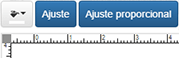
"FIT": "Ajuste",
"PROPORTIONAL_FIT": "Ajuste proporcional"
},
...
}
}
```
3. Apply this new translation at [initialization](https://customerscanvas.com/docs/cc4/visual-proofing-tool-configuration.htm.md) of Visual Proofing Tool by passing the **language** parameter.
`language: "es"`
As a result, the **FitButtons** looks as follows:
## Changing the Language at Runtime
For changing the language of the user interface at runtime, the Visual Proofing Tool provides the **setLanguage** method.
```
setLanguage(language: string): void
```
The following example illustrates how you can change the language at runtime.
```
```
## See Also
### Manual
- [Localization of Customer's Canvas](https://customerscanvas.com/docs/cc4/localization-of-cc.htm.md)
- [Visual Proofing Tool Configuration](https://customerscanvas.com/docs/cc4/visual-proofing-tool-configuration.htm.md)