VDP previews
- Last updated on October 24, 2025
- •
- 3 minutes to read
This topic demonstrates how to use Variable Data Printing (VDP) Rendering to generate personalized football team jerseys. The pipeline retrieves data from a design, renders previews, applies a mockup, and generates final print-ready files—all while dynamically inserting player names and numbers.
Prerequisites
- A design template with placeholders for player names and numbers.
- A mockup (e.g., a jersey template) to visualize the final product.
- VDP data in the required format (see Data Format).
Pipeline Workflow
The pipeline consists of the following tasks:
- Extract the design from the project.
- Render preview images (JPEG/PNG) for validation.
- Merge preview pages into a single file.
- Apply a mockup to visualize the final product.
- Render high-resolution print files (PDF).
- Finalize and output all artifacts.
Visual Workflow
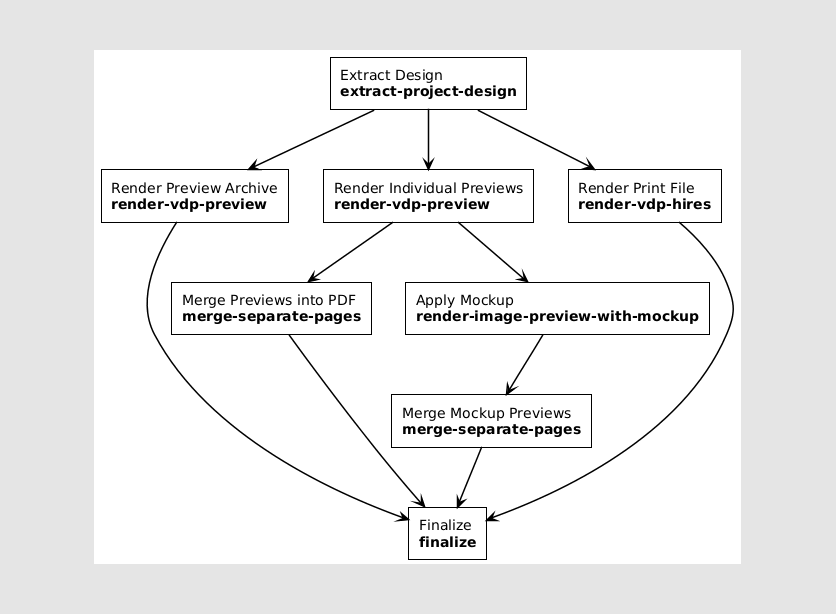
Pipeline Definition
{
    "tasks": [
        {
            "description": "Extract design from project",
            "name": "extract",
            "type": "extract-project-design",
            "parameters": {},
            "outputArtifacts": ["design"]
        },
        {
            "description": "Render preview archive (ZIP with JPEG files)",
            "name": "render-vdp-preview",
            "type": "render-vdp-preview",
            "inputArtifacts": ["design"],
            "parameters": {
                "previewOutputWidth": 1000,
                "previewOutputHeight": 1000,
                "previewOutputFileFormat": "jpeg",
                "previewOutputShowStubContent": true,
                "previewOutputShowMockup": true,
                "previewOutputArchiveType": "Zip",
                "previewOutputArchiveCompressionType": "LZMA"
            },
            "outputArtifacts": ["previewArchive"]
        },
        {
            "description": "Render individual preview files (PNG)",
            "name": "render-vdp-preview",
            "type": "render-vdp-preview",
            "inputArtifacts": ["design"],
            "parameters": {
                "previewOutputWidth": 1000,
                "previewOutputHeight": 1000,
                "previewOutputFileFormat": "Png",
                "previewOutputShowStubContent": false,
                "previewOutputShowMockup": false,
                "previewOutputArchiveType": "None"
            },
            "outputArtifacts": ["previewFilePage*"]
        },
        {
            "description": "Merge preview pages into a single PDF",
            "name": "merge-separate-pages",
            "type": "merge-separate-pages",
            "inputArtifacts": ["previewFilePage*"],
            "outputArtifacts": ["previewFile"]
        },
        {
            "description": "Apply mockup to preview pages",
            "name": "render-image-preview-with-mockup",
            "type": "render-image-preview-with-mockup",
            "inputArtifacts": ["previewFilePage*"],
            "parameters": {
                "mockupId": "68f866b1b7511aaff8a97eea",  // Replace with your mockup ID
                "previewWidth": 1000,
                "previewHeight": 1000,
                "previewFormat": "Png",
                "fitMode": "Shrink"
            },
            "outputArtifacts": ["previewFilePageWithMockup*"]
        },
        {
            "description": "Merge mockup preview pages into a single PDF",
            "name": "merge-separate-pages",
            "type": "merge-separate-pages",
            "inputArtifacts": ["previewFilePageWithMockup*"],
            "outputArtifacts": ["previewFileWithMockup"]
        },
        {
            "description": "Render high-resolution print file (PDF)",
            "name": "render-vdp-hires",
            "type": "render-vdp-hires",
            "inputArtifacts": ["design"],
            "parameters": {
                "hiResOutputDpi": 300,
                "hiResOutputFileFormat": "pdf",
                "hiResOutputColorSpace": "cmyk",
                "hiResOutputPdfTextMode": "Text"
            },
            "outputArtifacts": ["textFile"]
        },
        {
            "description": "Finalize pipeline",
            "name": "finalize",
            "type": "finalize",
            "finalArtifacts": [
                "previewArchive",
                "previewFile",
                "previewFileWithMockup",
                "textFile"
            ]
        }
    ]
}
Key Features
Data Format
The VDP data must be embedded in the design. For example, you can populate placeholders in a design as follows:
{
  "vdpDataSet": {
    "surfacesData": [
      {
        "surfaceBinding": {
          "surfaceIndexes": [0],
          "isSingleBinding": true
        },
        "data": [
          { "placeholders": { "name": "A. Smith", "number": "3" } },
          { "placeholders": { "name": "M. Johnson", "number": "7" } },
          { "placeholders": { "name": "D. Williams", "number": "12" } }
        ],
        "iterateOverSurfacesFirst": false
      }
    ]
  },
  "vdpItemsData": null
}
To change the entire layer content and style, you can provide data in the following format:
{
  "vdpDataSet": {
    "surfacesData": [
      {
        "surfaceBinding": {
          "surfaceIndexes": [ 0 ],
          "isSingleBinding": true
        },
        "data": [
            {
              "name": { "text": "Ibragimovich" },
              "number": { "text": "9" }
            },
            {
              "name": { "text": "Beckham" },
              "number": { "text": "23" }
            }
        ],
        "iterateOverSurfacesFirst": false
      }
    ]
  },
  "vdpItemsData": null
}
For mode details about providing data, see the Saving VDP data topic.
Output Artifacts
This pipeline generates four outputs:
- Multi-page print file (PDF) – High-resolution file for printing.
- Multi-page preview PDF – For validation.
- ZIP archive with JPEG files – One file per data sample.
- Mockup preview PDF – Visualization of the final product.
Mockup Integration
The mockup is applied using its unique identifier (mockupId). Ensure the mockup is uploaded to asset storage and its ID is pasted before running the pipeline.
Downloadable Assets
For reference, you can download zipped examples with a design template, a mockup, and rendered previews.
| Asset Type | Description | Example |
|---|---|---|
| Design Template | The design with placeholders for player names and numbers. VDP data is already embedded. | 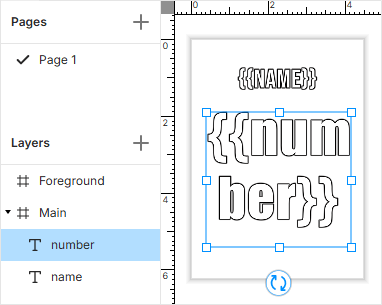 |
| Mockup | A visual template (e.g., jersey) for previewing the final product. |  |
| Preview Output | Generated VDP previews for validation. | 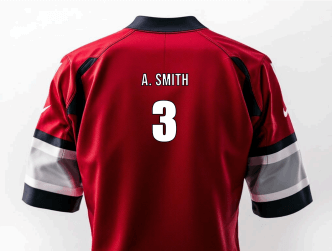 |
- For designers: find tutorials about designing mockups in the Mockups documentation.
- For integrators: find details about providing designs with VDP data in the Saving VDP data topic.