

API services
The Personalization Platform provides several web services that expose REST APIs. This page explains how to work with them.
Services
At the moment, the platform includes the following backend services:
- Asset Storage API manages Customer's Canvas data, CRUD operations for the designs, fonts, images, etc.
- Asset Processor API works with Customer's Canvas data when you need to process it, e.g. importing designs, getting previews, and similar operations.
- Asset Generator API generates die-cut templates and 3D mockups for packaging according to predefined specifications.
- Design Atoms API is mostly needed when working with the design object model, e.g. when you create your own editor.
- Storefront API provides all the operations you need to make the integration with an online store or e-commerce system.
- BackOffice API manages tenant-related data and manipulates PIM products.
API gateway
All these services are connected through an API Gateway. You can access it at:
https://api.customerscanvashub.com
If your Customer's Canvas tenant is hosted in the European environment, use https://api.eu.customerscanvashub.com. If it is hosted in the Australian environment, use https://api.au.customerscanvashub.com.
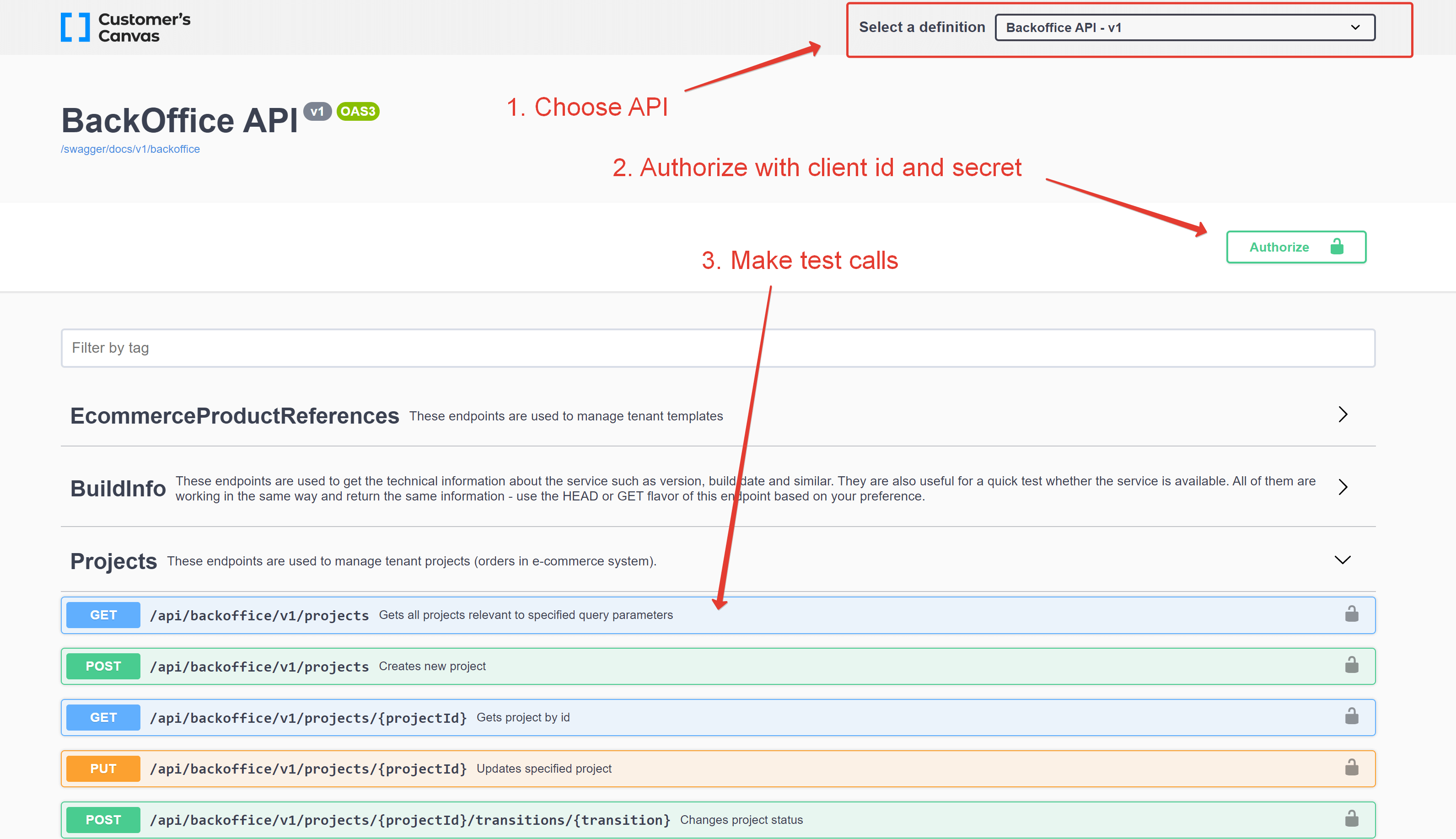
The API Gateway provides a Swagger UI interface that allows you to try the API without writing any code.
Authorization
Backend services authorization is based on the OAuth2 protocol. Customer's Canvas Hub supports three OAuth2 flows — Client Credentials, Implicit, and Authorization Code — and recommends the Client Credentials flow for backend integrations. To receive an access token, send a Client ID and Client Secret to https://customerscanvashub.com/connect/token. You create them in your Customer's Canvas account in Settings > External apps. For details, see Authentication.
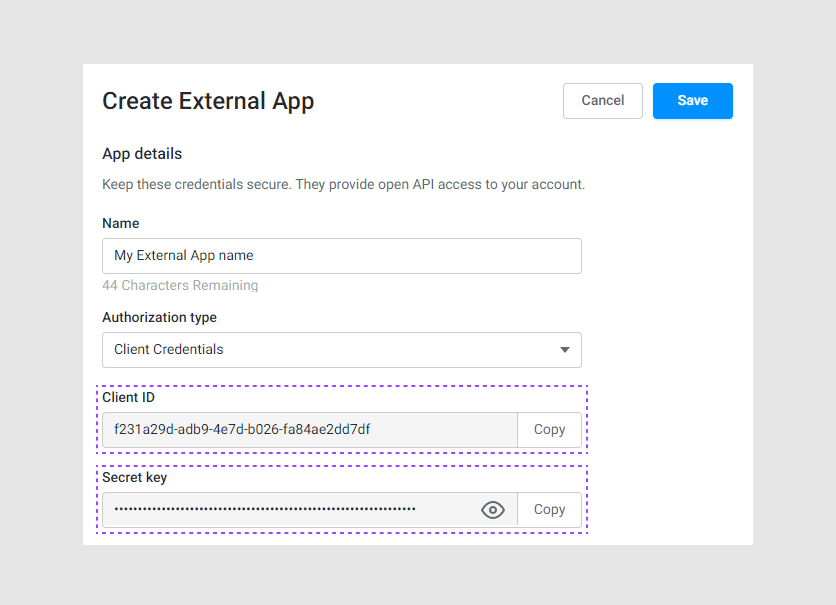
Once you receive an access token, you need to send it along with each request in the Authorization header with the Bearer prefix:
Authorization: Bearer <token>
You can also use the External App credentials directly in the Swagger UI (Authorize button) or in tools like Postman to receive a token automatically.
URLs
The API URL structure is always the same:
https://api.customerscanvashub.com/api/{short-service-name}/{version}/{endpoint}
The service that returns Swagger specs (as OpenAPI v3) has a similar structure:
https://api.customerscanvashub.com/openapi3/{short-service-name}/{version}
The table below puts it together. The info endpoint can be used as the simplest example of a working URL - feel free to copy it to Postman or another API testing tool and modify the address to the required endpoint.
| Service | Short name | Info endpoint | Swagger |
|---|---|---|---|
| Asset Storage | storage | Info URL | Swagger specs |
| Asset Processor | processor | Info URL | Swagger specs |
| Asset Generator | asset-generator | Info URL | Swagger specs |
| Design Atoms API | atoms | Info URL | Swagger specs |
| Storefront API | storefront | Info URL | Swagger specs |
| BackOffice API | backoffice | Info URL | Swagger specs |
API clients
Although you can use any HTTP client to send requests to the API endpoints directly, it is not the most efficient way to work with the API. Constructing JSON payloads before each call is error-prone, and hardcoding endpoint URLs is tedious.
You have the following options:
Use official API clients
We provide official API clients for five platforms:
- .NET (both .NET Core and .NET Framework)
- TypeScript for Angular
- Node.js (Axios-based)
- PHP
- Python
You can install them from NuGet, npm, Composer, or pip. You get all necessary data models implemented as native classes and also special HTTP client wrapper classes for making API calls.
See API clients for the full list, installation commands, and step-by-step guides.
Generate it from an OpenAPI document
As you have already noticed, you can get a Swagger spec for each service and create an API client yourself. You may use your favorite tools - NSwag, OpenAPI Generator, Jane, Swagger Editor/Codegen, and others. They allow you to generate an API client for the most popular platforms and languages - PHP, Python, JavaScript, Java, C#, and many more.
Most of these tools do not support 100% of the OpenAPI v3 specification and may fail to generate the correct code for certain endpoints. In this case, you may need to change the auto-generated code manually.
If the tools don't support the OpenAPI v3 specification but can work with OpenAPI v2, feel free to contact us. We can provide you with the v2 specs if it is more convenient for you.
Write a wrapper yourself
You don't have to learn the code generation tools and use the Swagger files at all. For example, if there are no tools for your platform, or if you just need to use a couple endpoints and you consider creating a separate library is excessive. In this case, just write mappers to transform your data structures into JSON payloads and a wrapper for the HTTP client manually.