- Introduction
- What's New?
- Features
- Upgrading the Design Editor
- Breaking Changes in 6.0
- Getting Started
- Integration with E-commerce
- Integration with Remote Asset Sources
- Printable Files and Proof Images
- Configuring Products
- Creating Product Templates
- User Interface
- Configuration Files
- APIs
- Add-ons
- System Requirements
- Troubleshooting
- Migrating Your Applications
- Licensing
- Copyright Notices
Breaking Changes in 6.0
Applies to: Customer's Canvas On-Premises; Design Editor 6.15.0, 6.x (may differ) · Archived documentation
We actively develop Customer's Canvas API and realize that critical changes may be unacceptable and complicate the update process. When some API elements become inconsistent and inconvenient, we first declare them deprecated, and they work in parallel with the new functionality for a while. In further major releases, we delete such deprecated elements.
This topic describes breaking changes in configuration parameters, markers, and the Web API that appear in Customer's Canvas 6.
- Bleed and Slug
- Changed configuration parameters
- Removed parameters
- Removed markers
- Renamed Parameters in the Web API
Bleed Zone and Print Area Size
Starting from version 5.33, we have changed the way we define the bleed zone and print area size, bringing the user experience closer to Adobe InDesign and other professional tools. Earlier, if you wanted to create a 3.5x2" business card with 1/8" bleed, you created a 3.75x2.25" design and put a safety line inside it.
But now, when you create a 3.5x2" design, the bleed zone will expand outside the design.
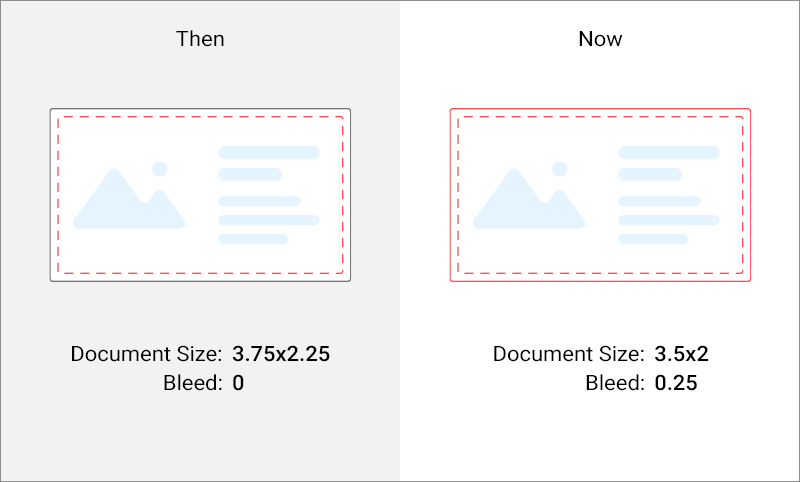
Bleed and Slug (the space outside the bleed zone) are now regulated by separate properties of the Print Area. If both safety lines and bleed margins are encountered, then the bleed has a higher priority. The safety lines are still displayed, but they no longer reflect the trim and bleed lines.
Accordingly, the logic for reading IDML files has changed when using the built-in Bleed and Slug fields. Earlier, the product size remains as is, and we automatically added a safety line object. Now, we expand the product by the size of Bleed and Slug. We consider the upper-left corner of the final product (i.e. trim line) as the origin, not the expanded design.
After upgrading to version 6, you may run into a problem when the size of the product is not what you expect, and unnecessary safety lines may also appear. If you encounter this, you can either rework the design and change the Bleed and Slug settings, or enable the old behavior. In the latter case, set LegacyIdmlBleedParsingEnabled to True in Aurigma.DesignAtoms.config.
For the products based on PSD templates, everything remains the same since they do not contain information about the bleed zone. However, if your designs do not contain backgrounds, we recommend using the bleed property instead of the safety lines.
Changed Parameters in Configuration Files
clientConfig.json
| Parameter Name | Old Value | New Value |
|---|---|---|
| watermark.text.fontSettings | "ArialMT" | "Roboto-Regular" |
AppSettings.config
| Parameter Name | Old Value | New Value |
|---|---|---|
| FontSubstitutionEnabled | "True" | "False" |
| SubstitutionFontPostScriptName | "ArialMT" | "Roboto-Regular" |
| DefaultFontPostScriptName | "ArialMT" | "Roboto-Regular" |
Removed Configuration Parameters
AppSettings.config
| Parameter Name | An Alternative |
|---|---|
| ParagraphTextEnabled | Not applicable |
clientConfig.json
| Parameter Name | An Alternative |
|---|---|
| arbitraryResizeForImageItemEnabled | IResizeGripsPermissions |
| defaultAssetSelectWidget | Not applicable |
| newImageName | defaultItemsConfig.image.name |
| canvas.snapLines.enabled | canvas.snapLines.{type}.enabled |
| canvas.snapLines.color | canvas.snapLines.{type}.color |
| canvas.snapLines.tolerance | canvas.snapLines.{type}.tolerance |
| canvas.ZoomStep | canvas.zoom |
| widgets.BottomToolbar.snapLinesCheckboxEnabled | widgets.BottomToolbar.snapLines{type}CheckboxEnabled |
| widgets.ColorPicker.defaultColorSpace | widgets.ColorPicker.colorSpace |
| widgets.ColorPicker.availableColorSpaces | Not applicable |
| widgets.ColorPicker.palette | IPaletteSection |
Removed Markers
| Marker Name | An Alternative |
|---|---|
<DPH>
|
Dynamic Image API
|
Renamed Parameters in the Web API
Endpoints
POST ~/api/Preview/GeneratePreview
POST ~/api/HiRes/GenerateHiRes
Parameters in the request payload
| Old Parameter | New Parameter |
|---|---|
| previewOptions.width | previewOptions.maxWidth |
| previewOptions.height | previewOptions.maxHeight |
Attributes in the response object
| Old Attribute | New Attribute |
|---|---|
| ProofImageUrls | proofImageUrls |
| StateId | stateId |
| HiResUrls | hiResUrls |