

Settings
In the Settings section, you can set up your tenant. Let's take a look at each setting tab.
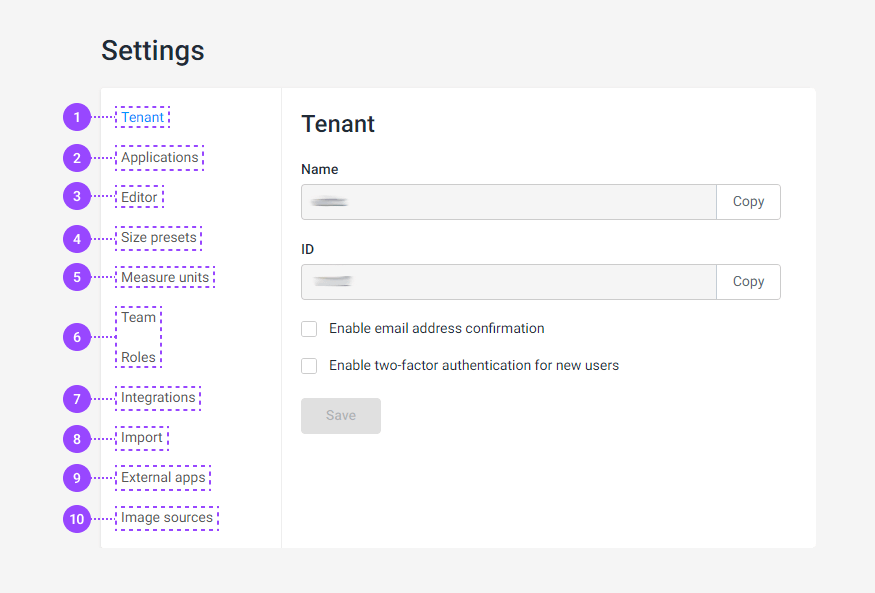
- Tenant. In this tab, you can see your tenant's name and your tenant ID. You can enable the e-mail address confirmation or two-factor authentication for admins and users. Learn more in the Tenant article.
- Application. You can see what Customer's Canvas applications are installed and their versions and URLs. Learn more in the Applications article.
- Editor. Here, you can set up the color profiles for color management, measurement units for editors, and the name of downloadable PDF files in your projects. Learn more in the Editor article.
- Size presets. In BackOffice, you can prepare presets to create a blank design in the Template Editor. Learn more about using presents in the Creating a new design article.
- Measure units. Here, you can set up measurement units that define the sizes of designs. Learn more in the Measure units article.
- Team and Roles. You can create new credentials for your teammates and manage what they can edit in BackOffice in these sections. Learn more in the Teams and Roles article.
- Integrations. Here, you can create integrations with your storefronts. Learn more about integrations in the Integrations section.
- Import. In this section, you can view and create marker shortcuts. Learn more in the Import article.
- External apps. Here, your tenant can grant access to external applications. Learn more in the External apps article.
- Image source. Here, you can set up an image source for the personalization process. Learn more in the Image sources article.