

Build a Headless Editor customization page
Build a storefront page that loads the Headless Editor, opens a product from PIM, renders its design variants and text fields with your own controls, and creates a Customer's Canvas project when the customer finishes. The result is a working starting point for driving the editor entirely from your own UI.
Prerequisites
- Node.js 22 or later
- A Customer's Canvas Hub tenant prepared for frontend integration
- A PIM product with at least one option and one connected design, configured in Customer's Canvas BackOffice
Set up the project
Create a Vite application that serves a static frontend and a small Express backend for Customer's Canvas API calls.
-
Scaffold a Vite project.
npm create vite@latest headless-quick-start -- --template vanilla-tscd headless-quick-startnpm install -
Install the backend dependencies.
npm install express dotenv axios concurrently tsxnpm install --save-dev @types/express @types/node @aurigma/axios-storefront-api-clientnpm install --save-dev @aurigma/workflow-elements -
Replace the
scriptsblock inpackage.jsonso the frontend and backend start together.{"scripts": {"dev": "concurrently vite \"tsx watch server/server.ts\""}}The
devscript starts Vite and the Express backend together. Leave the other Vite scripts unchanged.
Configure Customer's Canvas connection
-
Create an
.envfile in the project root. -
Add your Customer's Canvas values.
CCHUB_BASE_URL=https://customerscanvashub.comCCHUB_API_GATEWAY_URL=https://api.customerscanvashub.comCCHUB_ENVIRONMENT=usCCHUB_TENANT_ID=<tenant_id>CCHUB_STOREFRONT_ID=<storefront_id>CCHUB_CLIENT_ID=<client_id>CCHUB_CLIENT_SECRET=<client_secret>Use the EU or AU URLs and environment code when your tenant runs in another region. Keep
CCHUB_CLIENT_SECRETonly on the backend. Do not expose it inVITE_*variables or browser code.
Add the backend
Authenticate the backend
-
Create
server/cchub-auth.ts. -
Add the Customer's Canvas connection and OAuth2 helper.
import axios from "axios";import dotenv from "dotenv";dotenv.config();type AuthResponse = {access_token: string;expires_in: number;token_type: "Bearer";scope: string;};export const cchubEnv = {baseUrl: requireEnv("CCHUB_BASE_URL"),apiGatewayUrl: requireEnv("CCHUB_API_GATEWAY_URL"),environment: requireEnv("CCHUB_ENVIRONMENT"),tenantId: Number(requireEnv("CCHUB_TENANT_ID")),storefrontId: Number(requireEnv("CCHUB_STOREFRONT_ID")),clientId: requireEnv("CCHUB_CLIENT_ID"),clientSecret: requireEnv("CCHUB_CLIENT_SECRET"),};let cachedAccessToken: { value: string; expiresAt: number } | null = null;export async function getAccessToken(): Promise<string> {if (cachedAccessToken !== null && cachedAccessToken.expiresAt > Date.now()) {return cachedAccessToken.value;}const body = new URLSearchParams({client_id: cchubEnv.clientId,client_secret: cchubEnv.clientSecret,grant_type: "client_credentials",});const { data } = await axios.post<AuthResponse>(`${cchubEnv.baseUrl}/connect/token`,body,{headers: {"Content-Type": "application/x-www-form-urlencoded",},});cachedAccessToken = {value: data.access_token,expiresAt: Date.now() + (data.expires_in - 60) * 1000,};return data.access_token;}function requireEnv(name: string): string {const value = process.env[name];if (value === undefined || value === "") {throw new Error(`Missing ${name} environment variable.`);}return value;}This module keeps OAuth2 client credentials on the backend, requests an access token through the Client Credentials flow, and caches the token until shortly before expiration.
Create the Customer's Canvas API client
-
Create
server/cchub-api.ts. -
Add the storefront user registration and project creation helpers.
import {ApiClientConfiguration,ProjectsApiClient,StorefrontUsersApiClient,ProjectItemProductType,} from "@aurigma/axios-storefront-api-client";import type {CreateSingleItemProjectDto,CreateStorefrontUserDto,} from "@aurigma/axios-storefront-api-client";import { cchubEnv, getAccessToken } from "./cchub-auth";export type LineItem = {productId?: number;productVariantId?: number;productVersionId?: number;sku?: string;quantity: number;properties: {_stateId: string[];_userId: string;};};export async function getStorefrontUserToken(userId: string): Promise<string> {const accessToken = await getAccessToken();const usersApi = new StorefrontUsersApiClient(createApiConfig(accessToken));try {const user: CreateStorefrontUserDto = {storefrontUserId: userId,isAnonymous: true,};await usersApi.create(cchubEnv.storefrontId, undefined, user);} catch (error) {if (getErrorStatus(error) !== 409) {throw new Error(`Cannot create storefront user. User ID = ${userId}.`, {cause: error,});}}try {return await usersApi.getToken(userId, cchubEnv.storefrontId);} catch (error) {throw new Error(`Cannot get storefront user token. User ID = ${userId}.`, {cause: error,});}}export async function createProject(lineItem: LineItem) {const accessToken = await getAccessToken();const projectsApi = new ProjectsApiClient(createApiConfig(accessToken));const body: CreateSingleItemProjectDto = {ownerId: lineItem.properties._userId,item: {productSpecifier: {type: ProjectItemProductType.Product,id: lineItem.productId,versionId: lineItem.productVersionId,variantId: lineItem.productVariantId,},designIds: lineItem.properties._stateId,sku: lineItem.sku,quantity: lineItem.quantity,},};try {return await projectsApi.createWithSingleItem(cchubEnv.storefrontId,undefined,body);} catch (error) {throw new Error("Cannot create a project from the Headless Editor result.", {cause: error,});}}function createApiConfig(accessToken: string): ApiClientConfiguration {const config = new ApiClientConfiguration();config.apiUrl = cchubEnv.apiGatewayUrl;config.setAuthorizationToken(accessToken);return config;}export function getErrorStatus(error: any): number | undefined {return error?.response?.status?? error?.status?? (error instanceof Error ? getErrorStatus(error.cause) : undefined);}
Add the Express server
-
Create
server/server.ts. -
Add the routes that prepare the editor session and create the project.
import express from "express";import {createProject,getErrorStatus,getStorefrontUserToken,type LineItem,} from "./cchub-api";import { cchubEnv } from "./cchub-auth";const app = express();app.use(express.json());app.get("/", (request, response) => {response.send("Headless Editor quick start backend is running.");});app.get("/api/editor-session", async (request, response) => {const userId = String(request.query.userId ?? "quick-start-user");const productId = Number(request.query.productId);if (!Number.isInteger(productId) || productId <= 0) {response.status(400).json({ message: "The productId query parameter is required." });return;}try {const userToken = await getStorefrontUserToken(userId);response.json({scriptUrl: `https://staticjs-aurigma.azureedge.net/libs/${cchubEnv.environment}/workflow-elements/headless-editor/index.js`,styleUrl: `https://staticjs-aurigma.azureedge.net/libs/${cchubEnv.environment}/workflow-elements/headless-editor/styles.css`,config: {configVersion: 2,input: {productId,},integration: {tenantId: cchubEnv.tenantId,storefrontId: cchubEnv.storefrontId,cchubUrl: cchubEnv.baseUrl,cchubApiGatewayUrl: cchubEnv.apiGatewayUrl,user: {id: userId,token: userToken,},},settings: {viewerStates: {preInitEnabled: true,loadingEnabled: true,failedEnabled: true,},viewer: {enabled: true,},},},});} catch (error) {sendError(response, error);}});app.post("/api/projects", async (request, response) => {try {const lineItem = request.body as LineItem;const project = await createProject(lineItem);response.json(project);} catch (error) {sendError(response, error);}});app.listen(3001, () => {console.log("Backend is running at http://localhost:3001");});function sendError(response: express.Response, error: any): void {const status = getErrorStatus(error) ?? 500;const cause =error instanceof Error && error.cause != null? ` ${String(error.cause)}`: "";const message =error instanceof Error ? `${error.message}${cause}` : "Unexpected error";response.status(status).json({ message });}The server reads the environment once at startup, resolves the editor bundle URL for the configured environment, and creates a project from the line item returned by the editor.
Add the page
-
Replace the content of
index.html.<!doctype html><html lang="en"><head><meta charset="UTF-8" /><meta name="viewport" content="width=device-width, initial-scale=1.0" /><title>Headless Editor quick start</title><link rel="stylesheet" href="/src/style.css" /></head><body><main class="layout"><div id="viewer" class="viewer"><au-headless-editor></au-headless-editor></div><aside id="controls" class="controls"><h1 id="product-name"></h1><section id="variants"></section><section id="fields"></section><button id="finish" type="button">Finish</button></aside></main><script type="module" src="/src/main.ts"></script></body></html>The
au-headless-editorelement hosts the design viewer. The#controlspanel holds the design variant tiles, the text inputs, and the finish button that the page renders itself. -
Replace the content of
src/main.ts. Replace7263with your product ID.import type {IHeadlessEditor,IHeadlessEditorInitArgs,Product,} from "@aurigma/workflow-elements/headless-editor";const productId = 7263; // Replace with your product ID.type EditorSession = {scriptUrl: string;styleUrl: string;config: IHeadlessEditorInitArgs;};try {const session = await getEditorSession("quick-start-user", productId);if (session == null) {return;}await loadStyles(session.styleUrl);await loadScript(session.scriptUrl);await waitForEditorElement();const editor = getEditor();if (editor == null) {showMessage("Cannot open Headless Editor", "The editor element is missing.");return;}editor.addEventListener("error", event => {console.error("Headless Editor reported an error:",(event as unknown as CustomEvent<Error>).detail);});const initialized = await editor.init(session.config);if (!initialized) {showMessage("Cannot open Headless Editor","The editor failed to initialize. See the browser console for details.");return;}editor.addEventListener("variantchanged", renderVariants);editor.addEventListener("designvariantchanged", renderTextFields);editor.addEventListener("load", renderTextFields);setProductName(editor.getCurrentProduct());renderVariants();renderTextFields();document.querySelector<HTMLButtonElement>("#finish")?.addEventListener("click", async () => {const lineItem = await editor.addToCart();const project = await createProject(lineItem);console.log("Created project", project);});} catch (error) {showMessage("Cannot open Headless Editor", getErrorMessageText(error));}function setProductName(product: Product): void {const element = document.querySelector<HTMLElement>("#product-name");if (element != null) {element.textContent = product.name;}}function renderVariants(): void {const editor = getEditor();if (editor == null) {return;}const variant = editor.getCurrentVariant();const container = document.querySelector<HTMLElement>("#variants");if (container == null) {return;}container.replaceChildren(heading("Design variants"));for (const designVariant of variant.designVariants) {const tile = document.createElement("button");tile.type = "button";tile.className = "tile";tile.textContent = designVariant.designName ?? "Default design";tile.addEventListener("click", async () => {await editor.setCurrentDesignVariant(designVariant.id);});container.append(tile);}}function renderTextFields(): void {const editor = getEditor();if (editor == null) {return;}const container = document.querySelector<HTMLElement>("#fields");if (container == null) {return;}container.replaceChildren(heading("Text fields"));const textItems = editor.getCurrentSurfaceTextItems();for (const item of textItems) {const input = document.createElement("input");input.value = item.value;input.placeholder = item.schemaDefinition.prompt;input.required = item.schemaDefinition.required;input.setAttribute("aria-label",item.schemaDefinition.displayName || item.name);if (item.lengthLimits.maxCharacters > 0) {input.maxLength = item.lengthLimits.maxCharacters;}input.addEventListener("change", async () => {await editor.setTextItemContent(item.id, input.value);});container.append(field(item.name, input));}if (textItems.length === 0) {container.append(document.createTextNode("No text fields on this design."));}}function field(labelText: string, input: HTMLInputElement): HTMLElement {const label = document.createElement("label");label.textContent = labelText;label.append(input);return label;}function heading(text: string): HTMLHeadingElement {const element = document.createElement("h2");element.textContent = text;return element;}function getEditor(): (HTMLElement & IHeadlessEditor) | null {return document.querySelector("au-headless-editor") as (HTMLElement & IHeadlessEditor) | null;}async function getEditorSession(userId: string,id: number): Promise<EditorSession | null> {const params = new URLSearchParams({userId,productId: String(id),});const response = await fetch(`/api/editor-session?${params.toString()}`);return readJson(response, "Cannot open Headless Editor");}async function createProject(lineItem: unknown) {const response = await fetch("/api/projects", {method: "POST",headers: {"Content-Type": "application/json",},body: JSON.stringify(lineItem),});return readJson(response, "Cannot create project");}async function readJson(response: Response, titleText: string) {if (!response.ok) {showMessage(titleText, await getResponseErrorMessage(response));return null;}return response.json();}async function getResponseErrorMessage(response: Response): Promise<string> {try {const body = await response.json();return body.message ?? response.statusText;} catch {return response.statusText;}}function showMessage(titleText: string, message: string): void {document.body.innerHTML = "";const container = document.createElement("main");const title = document.createElement("h1");const details = document.createElement("p");container.className = "message";title.textContent = titleText;details.textContent = message;container.append(title, details);document.body.append(container);}function getErrorMessageText(error: any): string {return error instanceof Error ? error.message : String(error);}async function loadStyles(url: string): Promise<void> {const link = document.createElement("link");link.href = url;link.rel = "stylesheet";document.head.appendChild(link);}async function waitForEditorElement(): Promise<void> {// The editor bundle bootstraps its component onto the existing// <au-headless-editor> element. Wait until the element exposes the editor API instead.await Promise.race([waitForEditorApi(),new Promise((_, reject) =>setTimeout(() =>reject(new Error("The editor did not expose its API within 20 seconds.")),20000)),]);}function waitForEditorApi(): Promise<void> {return new Promise(resolve => {const check = (): void => {const editor = getEditor();if (editor != null && typeof editor.init === "function") {resolve();return;}setTimeout(check, 100);};check();});}async function loadScript(url: string): Promise<void> {await new Promise<void>((resolve, reject) => {const script = document.createElement("script");script.src = url;script.onload = () => resolve();script.onerror = () => reject(new Error(`Failed to load ${url}`));document.head.appendChild(script);});}The page renders the design variants of the current product variant as tiles. Selecting a tile calls
setCurrentDesignVariant(), which triggersdesignvariantchangedand rebuilds the text inputs for the new design. Entering text updates the matching text item. The finish button callsaddToCart()and sends the resulting line item to the backend, which creates the project.The helper waits until the editor exposes its API on the element and races that against a 20-second timeout. If the bundle cannot expose its API within that window or
init()reports a failure, the catch block shows an error message instead of leaving an empty viewer. Theloadlistener re-renders the text fields because the design variant items become available when the design finishes loading, afterdesignvariantchangedfires. Theerrorevent listener prints problems raised by the editor itself to the console.The example reads the product by
productId. To open a product by its external ID, pass{ productReferenceId: "<external_product_id>" }instead. See Integration guidelines. -
Replace the content of
src/style.css.html,body {height: 100%;margin: 0;}.layout {display: grid;grid-template-columns: minmax(320px, 1fr) 360px;height: 100vh;}.viewer {height: 100%;}au-headless-editor {display: block;height: 100%;}.controls {overflow-y: auto;padding: 24px;font-family: system-ui, sans-serif;}.controls h1 {font-size: 20px;}.controls h2 {font-size: 16px;}.tile {display: block;width: 100%;margin: 0 0 8px;padding: 8px;}label {display: block;margin: 0 0 12px;}input {box-sizing: border-box;width: 100%;padding: 8px;}
Run the app
-
Start the frontend and backend.
npm run dev -
Open the local URL printed by Vite.
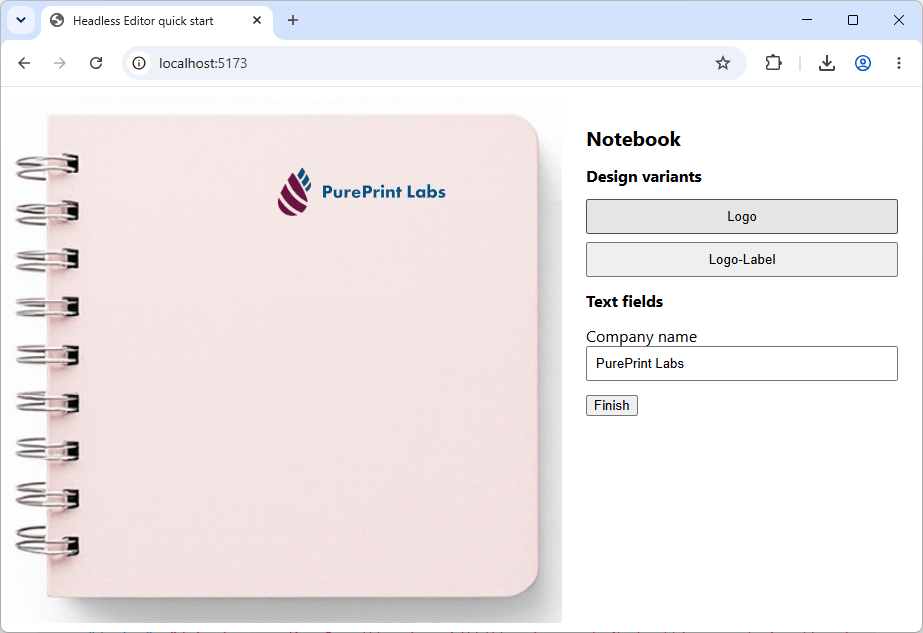
The page loads the product from the
productIdvalue insrc/main.tsand renders its design variants and text fields. -
Select a design variant tile and enter text into a field.
The viewer updates the design after each change.
-
Select Finish.
The browser console prints the created project object.
Next steps
- Integration guidelines — learn all initialization and finalization flows, including restore and
addToCart. - Products, options, and variants — build option selectors driven by product events.
- Design elements — edit image placeholders and barcodes in addition to text.