Key Takeaways for Print Providers
- The Paradigm Shift: Marketers are moving from broad, static batch runs (Ad-hoc) to continuous, event-driven programmatic mail (Triggered) to combat digital fatigue.
- The Economics: While Ad-hoc campaigns provide volume, Triggered mail acts as a high-margin growth engine, boasting response rates nearly 4 times higher due to hyper-relevance.
- The Tech Bottleneck: Traditional print software breaks at API ingestion. Legacy systems built for static PDFs struggle to parse real-time JSON webhooks without manual intervention.
- The Hybrid Architecture: To handle single-piece workflows profitably, PSPs need a Standardization Layer (Unified Front-End) that automatically catches API triggers, renders print-ready PDFs, and routes them into digital queues for touchless downstream batching.
The printing business model used to be straightforward: a client sends a file, you print a massive batch, mail them, and send the invoice. Today, however, marketers are shifting their focus from broad, traditional batch campaigns to continuous, always-on "Programs". Driven by stringent privacy regulations, the deprecation of third-party cookies, and widespread digital fatigue among consumers, this shift from blast to drip mail production means marketers increasingly want to send one highly personalized postcard to a single person based on a specific action, like visiting a website 24 hours ago.
For a Direct Mail Service Provider built for efficiency and scale, this creates a dilemma. You may not run triggered mail today, but your infrastructure must be ready for it. Let’s break down the differences, the economics, and the operational architecture you need to handle both streams without breaking your workflow.
What is Ad-hoc Direct Mail? (The "Batch" or "One-Off" Model)
Ad-hoc mail, often referred to on the production floor as batch runs, bulk mail, or one-off campaigns, is likely what you built your business on. It is the traditional blast approach where a marketer sends a list for a Summer Sale or Store Opening.
- The client’s goal: Reach and awareness to acquire new customers.
- The input: You receive a massive file and a static CSV/Excel list.
- The production reality: You set up the press once, costs drop with scale, and you face a strict, fixed drop date.
- Data fidelity: Personalization is typically limited to "Dear First Name".
What is Triggered Direct Mail? (The "Programmatic" Model)
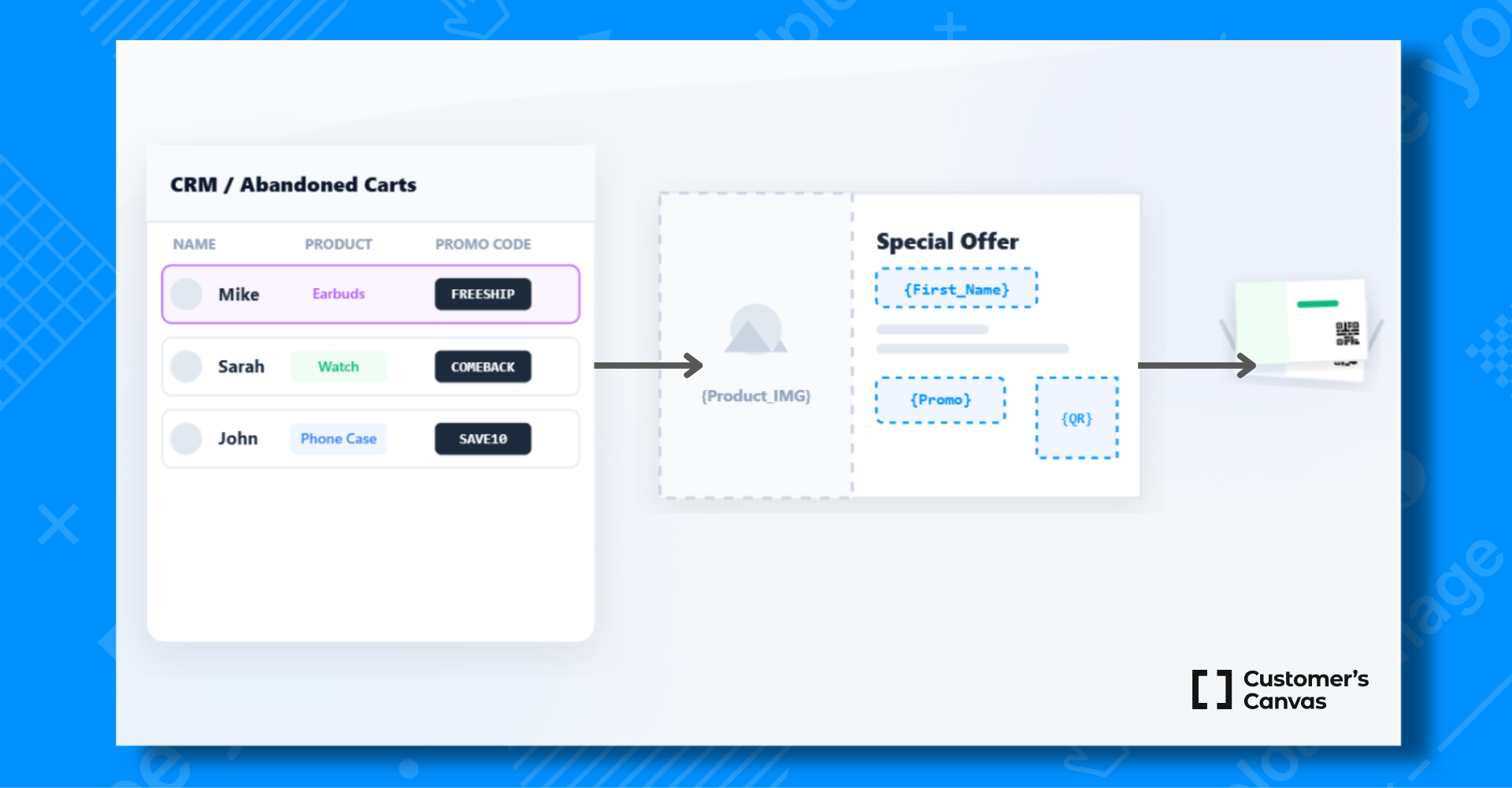
Triggered direct mail campaigns (or event-based mail) are driven by computer code, not by a marketing manager. For example, if a customer abandons an online shopping cart, the system waits 24 hours and automatically fires an API request to your print facility.
- The Client’s Goal: Conversion and retention. According to industry benchmarks like the ANA Response Rate Report, while standard ad-hoc batch mail averages a 2.7%–4.4% response rate, triggered mail response rates can be nearly 4 times higher due to hyper-relevance (a trend consistently highlighted in USPS and Lob State of Direct Mail data).
- The Input: A continuous daily flow of real-time JSON payloads via API ingestion.
- The Production Reality: One of the main operational challenges of triggered direct mail is managing low-volume triggered mail streams. You receive thousands of individual requests throughout the day, requiring a system that handles event-driven direct mail automatically. SLAs are usually under 48 hours from the trigger event.
Comparing the Economics & Operations
Ad-hoc is about Economy of Scale, while Triggered is about Speed and Data. While the cost per piece is higher for triggered mail, the value to the client is also higher.
| Feature | Batch runs | Triggered |
|---|---|---|
| Data source | Static CSV/Excel uploaded manually | Real-time JSON Payload via API Ingestion |
| Volume | High Spikes (Feast or Famine) | Consistent Daily Flow (Drip vs. Blast) |
| Production mode | Batch Manufacturing | One-Piece Flow (Print-on-Demand / POD) |
| SLA (Deadline) | "Drop date" is fixed | < 48 Hours Turnaround Time (TAT) |
| Tech requirement | Prepress Operator | Unified Front-End |
The Tech Challenge: JSON vs. PDF
If your intake system lacks proper API ingestion, you cannot offer triggered mail. JSON looks like code and contains the data (Name, Address, Cart Items) but not the design. Your system must instantly take that data, find the correct template, perform automated preflight, inject the text, and generate a print-ready file.
Industry Insight: Traditional MIS and Web-to-Print systems often break at the API ingestion stage. Because they were engineered specifically for batch manufacturing and static file uploads, they struggle with the continuous stream processing required to instantly parse real-time JSON webhooks without manual intervention.
The Architecture of Efficiency
Clients do not want separate vendors for their holiday catalogs and abandoned cart postcards; they want a marketing direct mail partner who does it all. Traditional batch campaigns provide your cash flow, while programmatic print workflows act as a high-margin growth engine.
Scaling single-piece direct mail production does not mean you actually print one postcard at a time. Instead, smart infrastructure software acts as a Standardization Layer.
- It receives thousands of API triggers daily.
- It validates the data and renders standardized PDFs.
- It routes these files into a digital production queue (Hot Folders).
From there, your downstream production workflow (such as Enfocus Switch, HP SiteFlow, or Xerox FreeFlow) grabs the files and performs batching and ganging to optimize paper usage.
By eliminating manual preflight, this architecture enables a true "touchless" workflow. An order moves from a digital trigger (like an abandoned cart) straight to the digital press queue without any human prepress intervention, drastically reducing your Turnaround Time (TAT).
Preparing Your Infrastructure
The market is evolving. To gain a competitive advantage and satisfy the full spectrum of your clients' use cases, you need to expand your capabilities. You tell your clients: "Yes, we can handle your million-piece mailer. And yes, we can connect to your Salesforce to print 50 birthday cards a day."
You already have the presses and the logistics; now you need a Unified Front-End. Customer’s Canvas bridges the gap between client demand (API/CSV) and your production reality, ensuring that whether the order is one piece or one million, your floor receives a print-ready file.
Ad-hoc (or batch) production relies on manual uploads of static lists for large, one-off runs with fixed deadlines, often referred to as blast mail. Triggered (or programmatic) mail is an always-on, event-based approach that relies on API ingestion to automatically produce individual, highly personalized pieces based on specific user actions (drip mail).
The key to profitability is reducing touchpoints in short-run mailings. By using a standardization layer like Customer's Canvas for on-demand direct mail fulfillment to automatically catch individual API requests, render them into print-ready PDFs, and route them to a digital queue, you optimize your touchpoints per order and eliminate prepress labor and setup costs per piece.
Yes. An efficient hybrid direct mail operation does not actually print one piece at a time. A unified front-end receives continuous triggers throughout the day and standardizes the files into a hot folder. Your production workflow software then aggregates these files for automated small-batch printing to maximize paper usage and press time.
Traditional print software is built to ingest static PDFs and spreadsheets for batch manufacturing. It generally lacks the workflow automation for programmatic print required to parse real-time JSON webhooks via API ingestion, perform automated preflight, and instantly inject variable data to generate a print-ready file without human intervention.
A touchless workflow means a direct mail order goes from a digital trigger directly to the digital press queue (supporting Print-on-Demand and JIT manufacturing) without any human prepress intervention. The system automatically handles data intake, VDP rendering, routing, batching, and prepares files for dynamic finishing, drastically reducing your Turnaround Time (TAT).