What a Direct Mail Feature Actually Involves
From the user's point of view, the job is simple and looks exactly like an email campaign: pick an audience, pick a design, personalize it, hit send. One-time blast, recurring send, or a triggered mailing fired by an event — cart abandonment, a loyalty milestone, a lapsed renewal.
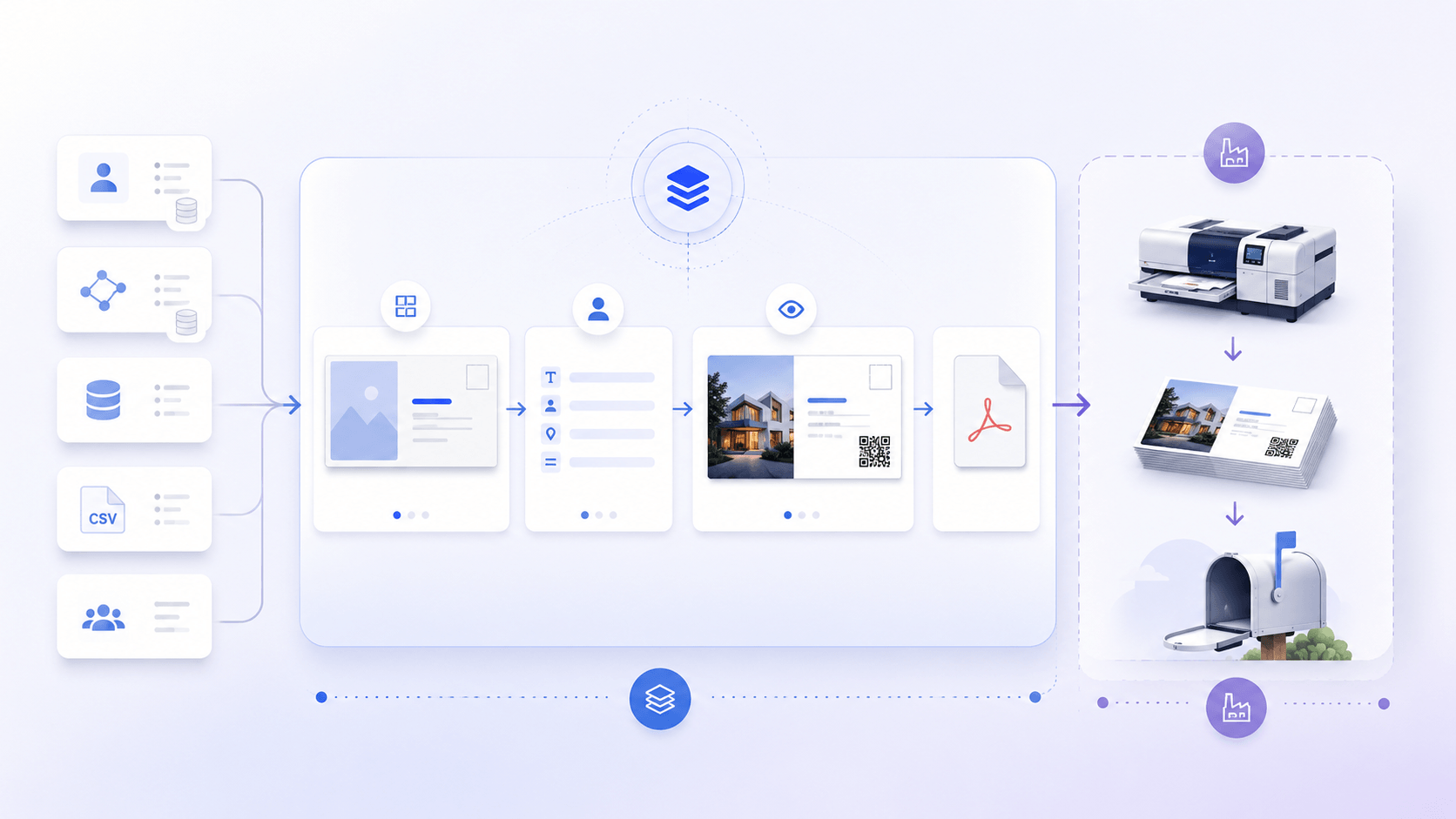
Behind that experience, your platform has to do things email never required: manage print-grade design templates, merge recipient data into them safely, render print-ready files at campaign scale, and hand everything to a print partner in a form their production line accepts.
The system also doesn't live alone. Upstream, it connects to wherever audience data lives — your own database, the customer's CRM, a data vendor. Downstream, it connects to a print partner (in-house or external) and, through them, to the postal service.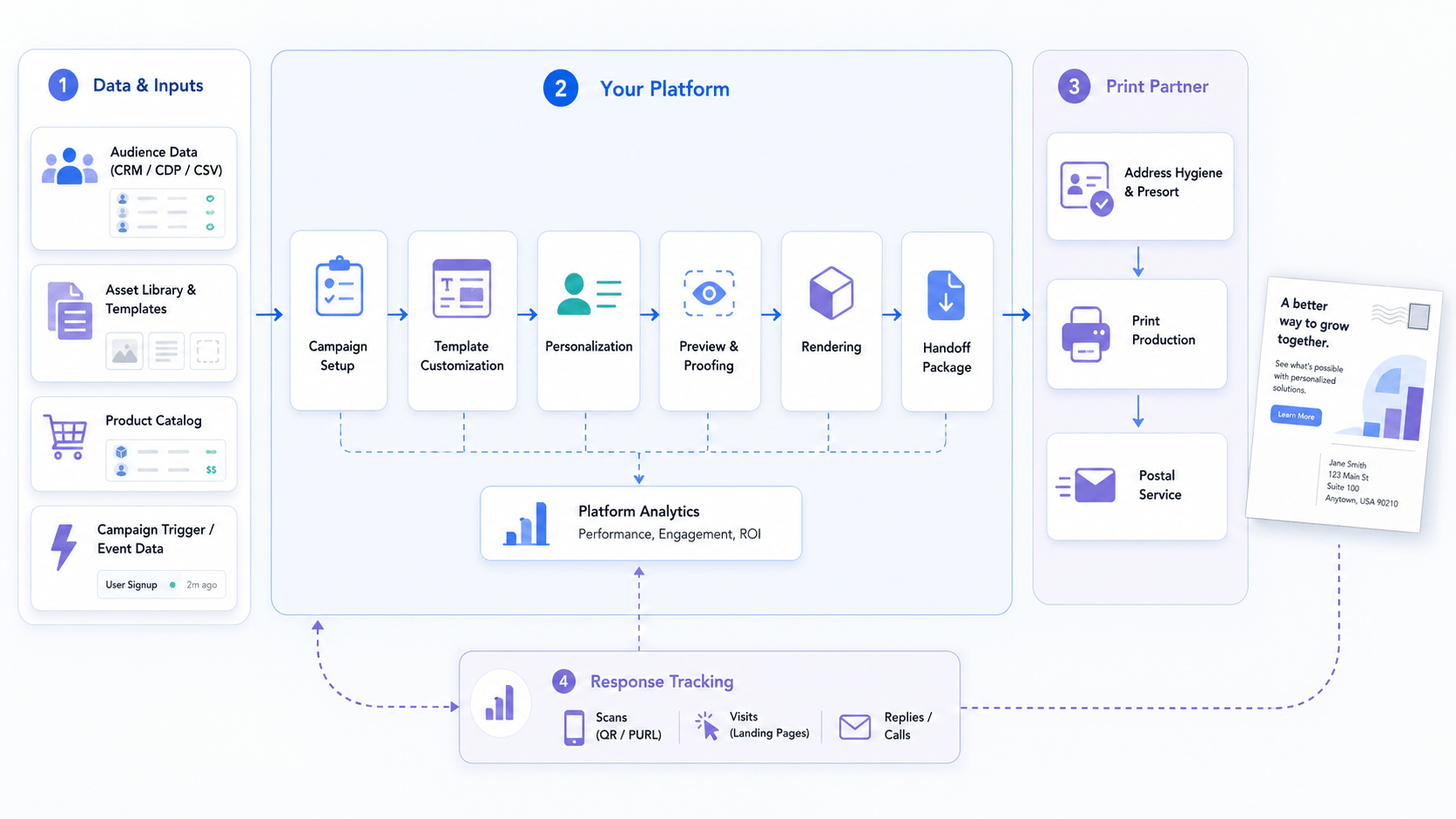
Two Zones of Responsibility
The cleanest way to scope this system is not by technology but by responsibility.
Your zone is everything customer-facing plus data preparation: campaign setup, template customization, personalization, preview, rendering, and packaging the output (files and address data) for handoff.
Your print partner's zone is everything after handoff: address hygiene and CASS/NCOA processing, presorting, imposition on press sheets, printing, and lodgment with the postal service. Even when "the print partner" is another department of your own company, it operates as a separate zone with its own tooling and standards.
The practical rule: the cleaner the package you hand over, the less friction and cost on the other side. Much of the architecture below exists to make that handoff clean.
The Components of the System
A complete direct mail feature decomposes into roughly nine components. Here is each one and what it's responsible for.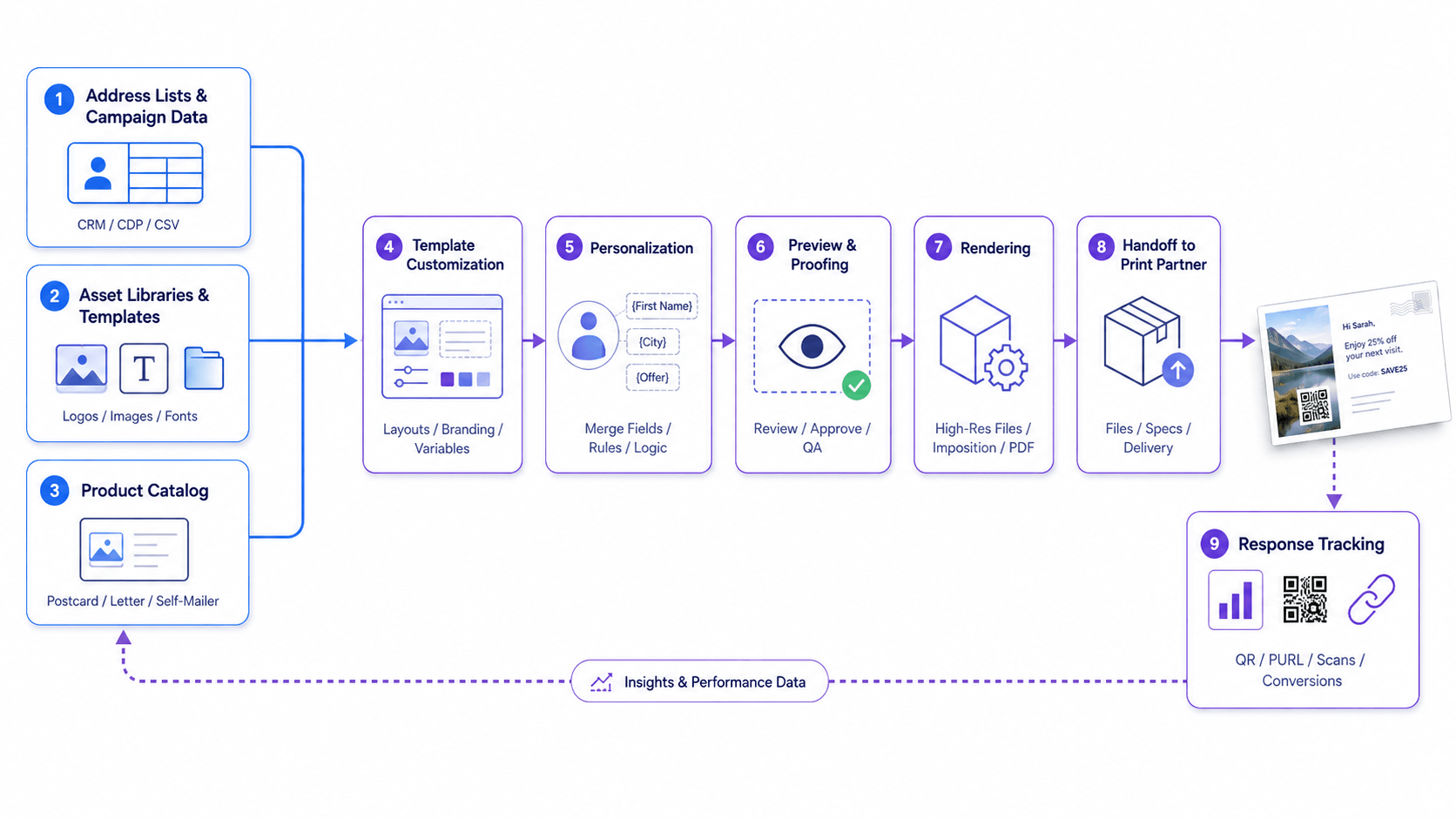
Address Lists and Campaign Data
Recipient data can already live in your platform, come from the customer's CRM or marketing automation tool, be bought from a data vendor, or arrive as a CSV upload. The system needs to accept all of these.
Structurally, the data splits in two: fields needed for delivery (name, address) and fields needed for personalization (first name, offer, loyalty tier, store location). They overlap but serve different consumers. The first set ultimately goes to the print partner, the second gets merged into the design. Validation matters at intake: catching malformed rows before rendering is cheap; discovering them after 300,000 rendered pieces is not.
Asset Libraries and Templates
Campaigns start from templates, and templates need a home: libraries of designs, images, logos, and fonts, organized per customer. The key structural decision is that templates are created by one kind of user (a designer, often in professional tools like InDesign) and used by another (a marketer with no design training). The library layer is what separates those two roles cleanly.
Product Catalog
A campaign is printed on something: a postcard, a letter, a self-mailer. Each format is a product with sizes, options, and its own template geometry. Products can be more complex than a flat card — envelopes, folded pieces, embellishments like foil or spot varnish. What you can offer here is dictated by what your print partner can produce, so the catalog is effectively a contract between your platform and their equipment.
Template Customization
The marketer needs to adapt a template — swap a logo, change the offer text, pick an image — without breaking it. That means a WYSIWYG editor with guardrails: brand elements locked, postal zones (address block, indicia) protected, fonts and colors constrained to what the brand allows. Customization is a deliberately limited activity, and that limitation is a feature: it's what lets a non-designer produce production-safe artwork.
Personalization
Personalization is merging recipient data into the design — and at minimum it's {{first_name}} substitution. In practice, campaigns quickly need more: a different image per segment, a unique QR code per recipient, content blocks that appear conditionally, and layouts that tolerate a three-line address where the design assumed one. Each step up is a qualitative jump in complexity, so it's worth deciding early how far up this ladder your customers actually need to go.
Preview and Proofing
Before a customer commits budget, they need to see what will actually print — with real data merged in, not lorem ipsum. The critical requirement: the preview must be produced by the same engine that renders the final files. If preview and output come from different code paths, they will eventually disagree, and the disagreement gets discovered on paper.
Rendering
Printers don't accept just any file. They accept files that meet their specifications. That places real requirements on the rendering engine: CMYK color with the right ICC profiles, embedded fonts, correct bleeds and trim marks, images at production resolution. Some partners will also ask for specific output formats such as PDF/VT, which is built for variable data printing and carries per-record structure the press can use directly. These requirements are worth confirming with your partner early, because they constrain which engine you can use or build.
Volume adds a second set of requirements. Large mailing lists mean many renders running at once, and a system that handles them naively will fall over under the load. The usual approach is to decouple submission from execution — a message queue or similar mechanism that accepts jobs and feeds them to workers at a rate the system can sustain. And if you're committing to SLAs with customers — a campaign of a given size ready within a given window — horizontal scaling becomes essential: adding rendering workers to meet a peak and releasing them afterward.
Handoff to the Print Partner
The output of rendering is not the end of your pipeline. The handoff package includes the files (in the output mode the partner needs — one consolidated PDF, one file per recipient, or batches) and the address data, formatted the way print workflows expect it. The less cleanup the partner has to do in tools like AccuZip, the faster and cheaper the job runs. Delivery itself is multi-channel in practice: hot folders over FTP/SFTP, cloud storage, webhooks.
Response Tracking
Physical mail is rarely fire-and-forget; the point is a response. The standard mechanism is a QR code or short URL — unique per campaign or per recipient. For attribution to work, that URL has to route through your system first and then redirect to the landing page, so the scan is recorded and tied to the campaign and recipient. Which raises a product question worth deciding early: do you host landing pages too, or redirect to pages the customer owns?
Conclusion
Nine components, each reasonable on its own — and together, a system that touches design tooling, data pipelines, distributed rendering, print production standards, and attribution. The harder part is that they have to fit together properly. Templates need to work with both the editor and the personalization engine — the same rules about what's locked and how text reflows have to hold in both. The rendering engine needs to understand those templates natively, including their variable fields and constraints. Preview has to come from the same engine as final output. The seams between components are where this kind of system usually gets difficult.
There are broadly three ways to arrive at it. You can assemble the pieces from different systems and stitch them together — workable, though the integration work is real and permanent. You can allocate a serious budget and build the whole thing yourself, which makes sense when this capability is central to your product. Or you can find a vendor that covers the stack and takes the integration burden with it. Which path fits depends on how central direct mail is to your platform, and on how much of this you want to still be maintaining a few years from now.