Ask any prepress operator what actually eats their day, and the answer is rarely the print run itself.
It is the file that arrives with the wrong page setup. The missing bleed. The low-resolution image that looked fine on screen but will not hold up in print. The artwork that simply does not match the product being ordered.
None of these problems are particularly dramatic on their own. But multiply them across every order that comes through a print shop, and they become a significant operational cost.
There is the time spent finding the problem. The email back to the customer. The wait for a corrected file. The second check to make sure the correction actually worked.
And then there is the production time that has been quietly pushed backwards while everyone waits.
The hidden cost of a bad file
The problem with artwork errors is not simply that they need fixing. It is that they interrupt a process that was supposed to be moving forward.
A job arrives. Prepress reviews it. Something is wrong. Instead of moving toward production, the job moves sideways.
Someone identifies the issue. Someone contacts the customer. The customer finds the original artwork, makes a change, exports another version, and sends it back. Prepress checks it again.
If the new file still has an issue, the cycle starts over.
None of those hours necessarily appear on an invoice. The customer is not paying separately for the back-and-forth. Yet the labor is real, and it comes directly out of the time and capacity available to the print operation.
For print businesses working with tight margins and demanding turnaround times, that matters.
The expensive part of a bad file is not finding it. It is finding it too late.
The problem gets bigger as print becomes more accessible
Online print ordering has made professional printing available to a much wider audience. That is good for the industry.
But it also means print businesses increasingly receive artwork from people who are not designers, prepress specialists, or production professionals.
Customers may know exactly what they want printed without knowing whether their artwork is technically suitable for production.
They may upload an image at the wrong resolution. Forget the bleed. Use artwork with the wrong page setup. Or submit a file that needs attention before it can move into production.
The more accessible self-service print becomes, the more important it becomes to make the artwork stage capable of handling that reality.
You cannot expect every customer to understand prepress. And you should not need your prepress team to manually solve the same predictable problems on every order.
Move the artwork check upstream
That is the thinking behind Artwork Intelligence & Repair inside Customer’s Canvas. The goal is not simply to make prepress faster.
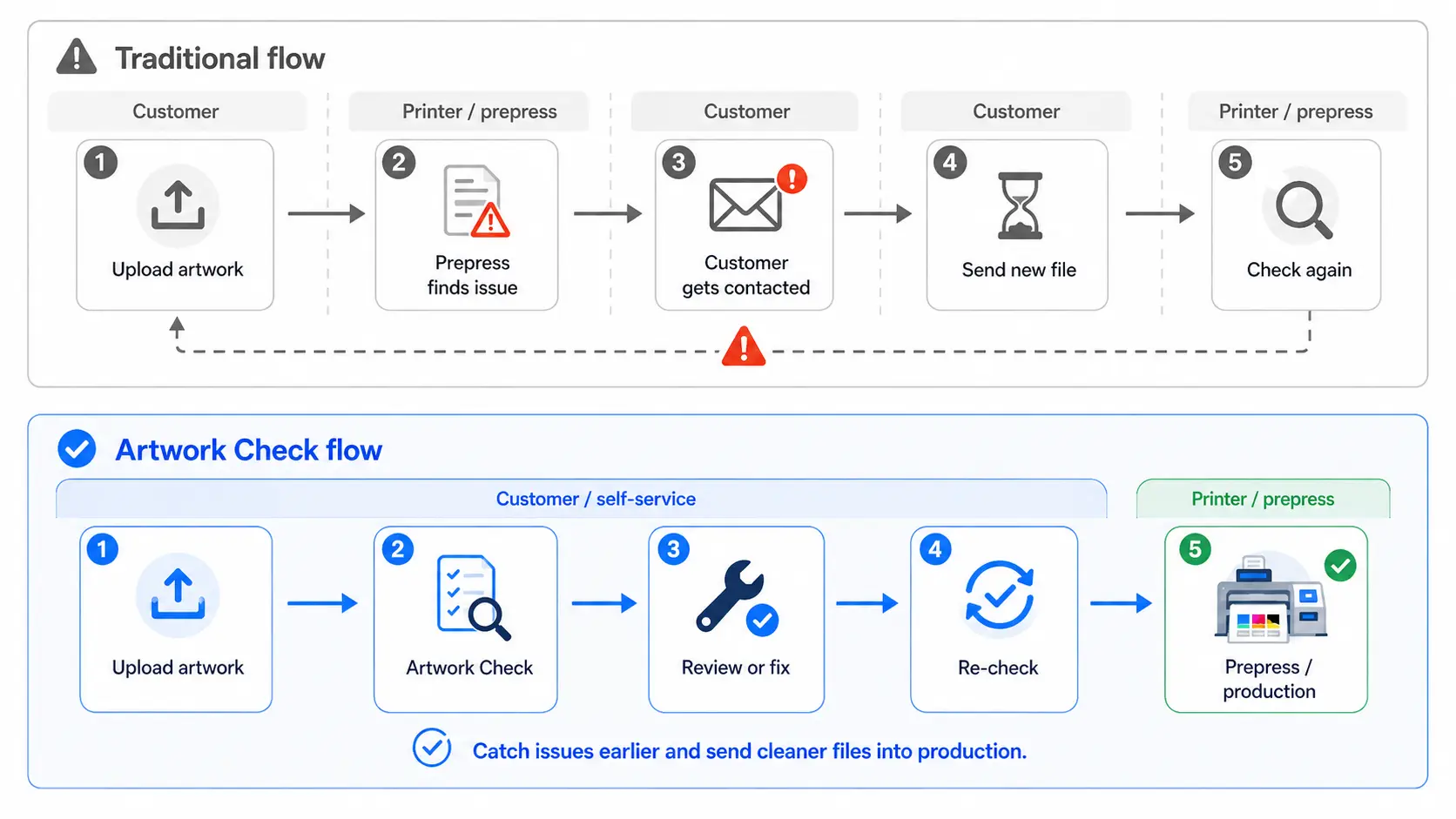
It is to catch common artwork problems earlier, while the customer is still submitting the order, and help resolve supported issues before they become another manual task for the prepress team.
The workflow is straightforward.
A customer uploads their artwork. They see the actual file in the ordering experience.
Artwork Check evaluates the artwork in the context of the product being ordered and highlights anything that needs attention.
Instead of exposing technical PDF internals, the system presents practical findings such as:
- Page setup. The artwork does not match the size or setup required for the ordered product.
- Image quality. An image may not have enough resolution for the size at which it will be printed.
- Bleed. The background does not extend through the required bleed area.
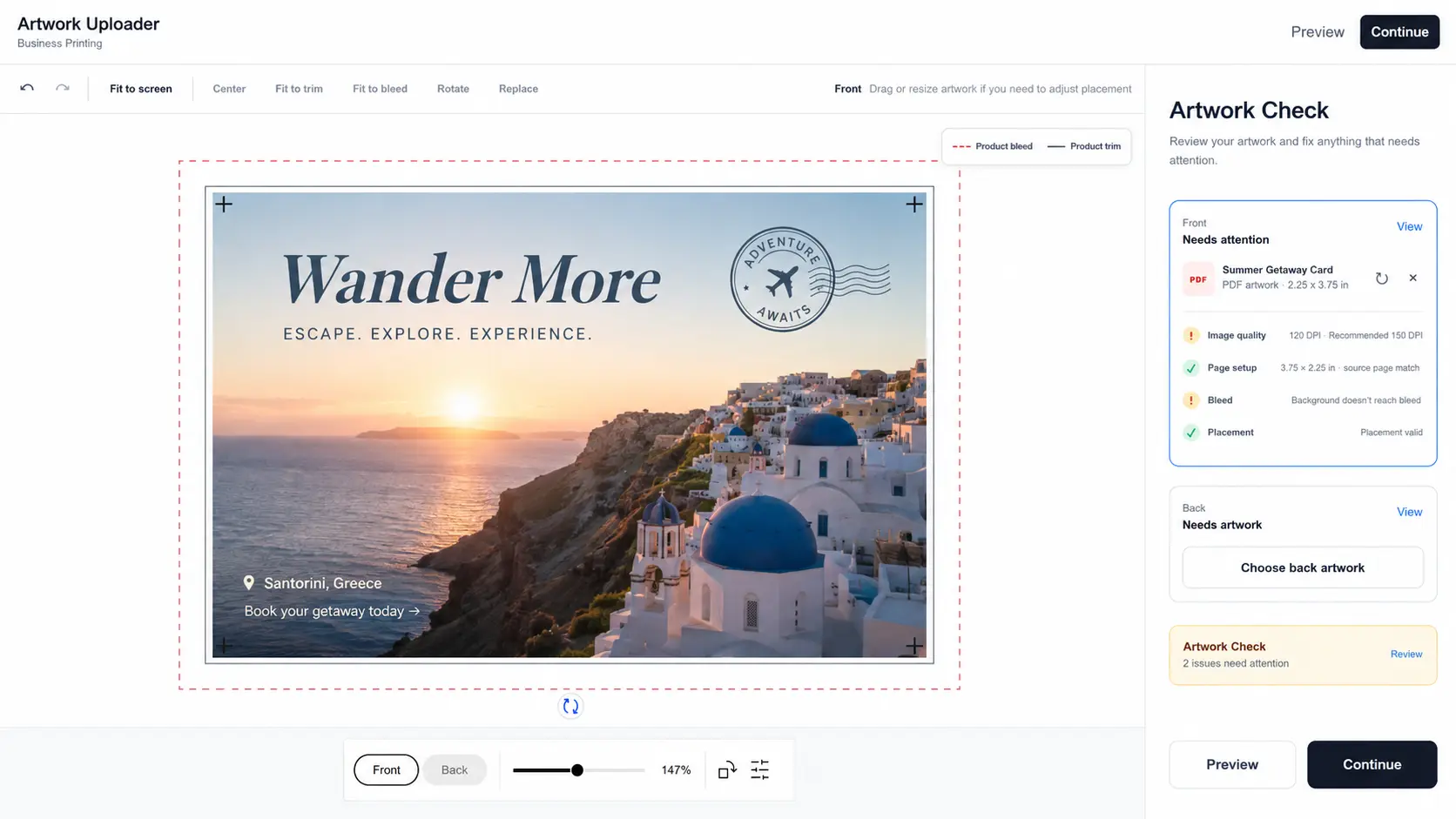
If everything is ready, the customer keeps moving.
If something needs attention, they can review the issue and, where a supported repair is available, fix it as part of the same workflow.
That is the difference between simply identifying a problem and preventing it from becoming another prepress task.
Finding the problem is only half the job
Traditional preflight is good at telling you that something is wrong. But in many workflows, that is where the manual work begins.
Artwork Intelligence & Repair is designed to take the next step where it can do so safely.
For a page-setup issue, Customer’s Canvas can offer a controlled correction based on the product geometry.
For a low-resolution image, the system can identify the affected image and offer an AI-assisted quality improvement.
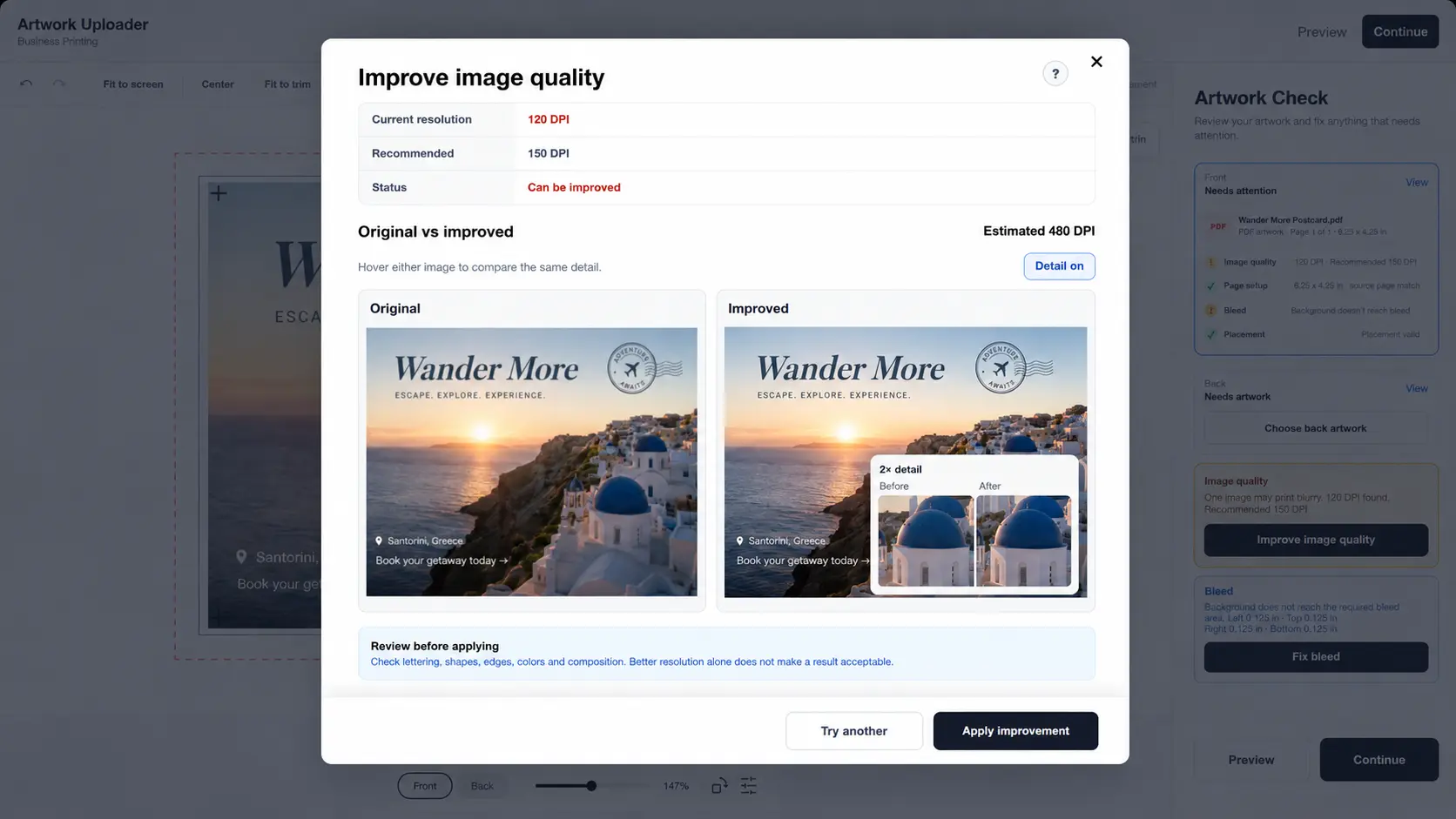
The customer can review the proposed result before applying it. For image-quality repair, they can even test the improvement on a small representative area before committing to processing the full image.
For missing bleed, eligible background artwork can be extended into the required area while leaving unrelated foreground text, logos, and vector content unchanged.
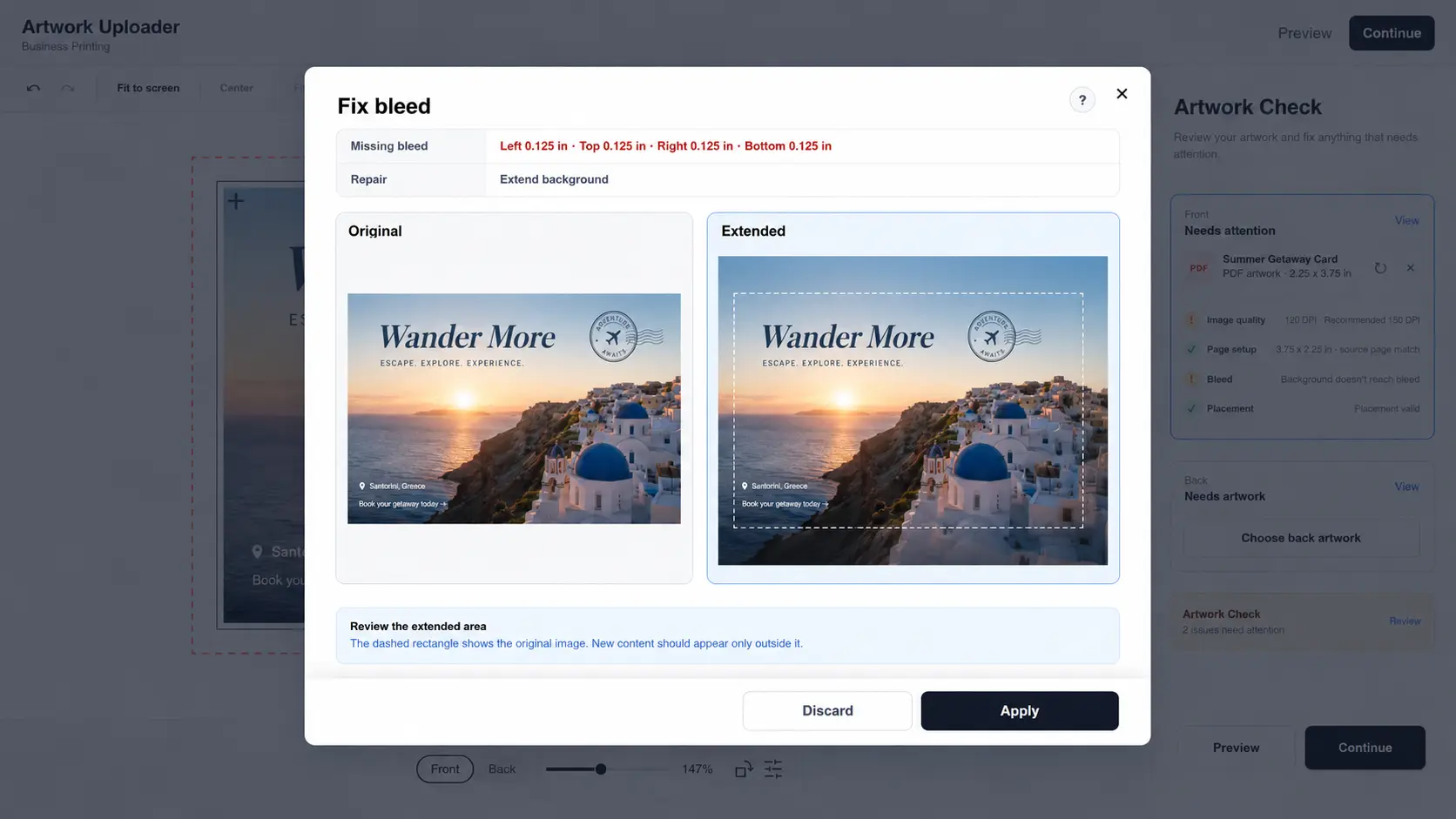
And the original customer file is not silently overwritten.
A repair creates a new version, and the resulting artwork is checked again before the issue can be considered resolved.
That last step matters.
Making a change is not the same thing as proving the problem is fixed.
What this looks like in practice
The workflow we are bringing to PRINTING United looks less like a standalone preflight utility and more like part of the ordering experience itself.
The customer uploads a business card, postcard, flyer, or other prepared artwork. The artwork appears in the editor. Artwork Check runs in the background and surfaces anything that needs attention.
The customer can review the issue, make an adjustment or run a supported repair, preview the result where appropriate, and apply it. The repaired artwork is then checked again.
Only after that does the order continue with a cleaner, more production-ready file.
The goal is not to make every artwork decision automatic. The goal is to stop predictable, fixable problems from reaching prepress simply because nobody checked them earlier.
It also changes the customer experience
There is another cost to bad artwork that is harder to put into a spreadsheet: friction.
Self-service ordering promises customers a simple experience: choose what you want, upload your artwork, place the order.
When the next step is an email saying, “Your file doesn’t work,” that promise starts to break down.
The customer has already completed what they thought was their part of the process. Now they have to understand a technical problem they may not be equipped to solve, find the original artwork, make a correction, and try again.
Catching the issue while the customer is still in the ordering flow is a very different experience.
Instead of hearing from prepress later, the customer can see what needs attention while the job is still in front of them and, where possible, resolve it immediately.
That keeps the experience much closer to what self-service ordering was supposed to feel like in the first place.
This is not about replacing prepress
Artwork Intelligence & Repair is not about removing the need for skilled prepress professionals.
Complex files will always require human judgment. Unusual production requirements will always benefit from experience. There will always be jobs where a specialist needs to make the final call.
The opportunity is the recurring, predictable category of problems: the issues that appear again and again, the errors that are tedious precisely because they are common.
If those problems can be identified and, where possible, resolved before the order reaches prepress, skilled operators can spend more of their day on work that actually requires their expertise.
Bring us a bad file
At PRINTING United 2026, Customer’s Canvas will demonstrate Artwork Intelligence & Repair live.
And we do not want to show it only on a file created to make the demo look good.
Bring us a bad file.
We will run it through Artwork Check at Booth C230 and show you what the system can detect, what it can help repair, and what still needs a human.
That distinction matters.
Print businesses do not receive perfect demo files every day. They receive files from customers, marketers, office teams, resellers, and people who may never have opened a professional design application in their lives. Those are the files the workflow has to deal with.
Bad artwork is not the most glamorous problem at a trade show full of presses, finishing systems, and large-format equipment. But for the people actually running print operations, it is one of those quiet problems that consumes time every day.
Artwork Intelligence & Repair is our attempt to move that work out of the prepress queue and closer to the moment the artwork enters the order.
See Artwork Intelligence & Repair live at PRINTING United 2026.Booth C230
customerscanvas.com/company/events/printing-united-26