The order is in. So why is the work only just beginning?
A customer visits your online storefront, personalizes a brochure, reviews the preview, approves the design, and places an order. The process feels seamless. From the customer's perspective, the job is complete.
Behind the scenes, however, a member of your team downloads the artwork, checks the file, corrects a formatting issue, renames the document, and transfers the job specifications into another system. They may need to confirm the paper stock, quantity, finishing requirements, and approval status before production can begin.
The customer has completed an online purchase, but your team is still doing the work needed to make that order production-ready.
For many print businesses, this is where the real automation challenge begins.
Web-to-print technology has made it easier to sell personalized products online. But automating the storefront does not necessarily automate everything that happens after checkout. When manual tasks remain between ordering and production, they can introduce delays, increase the risk of errors, and limit the operational benefits of investing in digital ordering.
The opportunity is to look beyond the point of purchase and examine what happens next.
1. Find the gaps between checkout and production
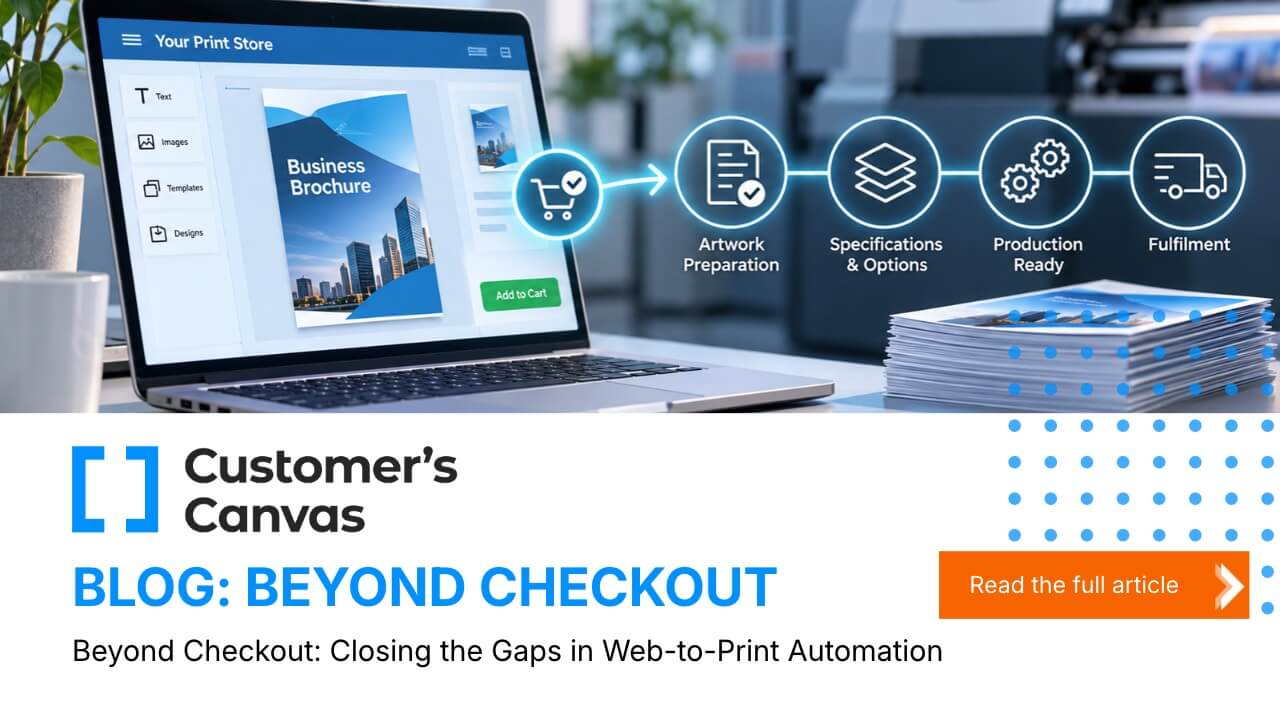
A web-to-print order passes through several stages before it becomes a finished product. Depending on the business, these might include artwork preparation, file validation, job specification checks, prepress, imposition, production scheduling, and fulfilment.
Every time information moves between people or systems, there is an opportunity for a manual task to creep in.
Common examples include:
- Artwork checks: Staff manually inspect customer files for missing information, incorrect dimensions, or other issues that need attention before production.
- File preparation: Approved designs are downloaded, renamed, converted, or adjusted before they can move to the next stage.
- Specification entry: Quantities, materials, finishing options, and delivery details are copied from the storefront into production or management systems.
- Approval verification: Employees check whether the customer has approved the artwork and whether the correct version is being used.
- Job handoffs: Production teams receive files and instructions through separate systems, emails, or shared folders, requiring additional checks before work can begin.
Individually, these tasks might seem insignificant. Collectively, they can create a substantial amount of administrative work.
The first step towards closing these gaps is understanding where your team still needs to intervene and whether that intervention is genuinely necessary.
2. A file transfer is not the same as production automation
Moving artwork from an online storefront to a production environment is useful, but it only addresses part of the process.
Production needs more than a file. It needs the right file, the right specifications, and the information required to manufacture and deliver the order correctly.
Consider a personalized brochure order. The artwork might be ready, but production still needs to know the finished dimensions, quantity, paper stock, finishing options, and any relevant delivery requirements. The team also needs confidence that the correct artwork has been approved.
If these details are held in different systems, someone may need to reconcile them manually before the job can proceed.
This is why effective web-to-print automation needs to consider both artwork and order information.
The aim is to reduce unnecessary handling while maintaining the checks that protect production quality. That means looking at how files are generated and validated, how specifications are captured, and how information is passed to the systems responsible for the next stage.
Integrations can help connect these stages, reducing the need to re-enter information or move files manually. However, the value depends on how well the systems exchange the information each stage actually needs.
A connected process is not simply one in which systems can communicate. It is one in which the right information reaches the right place at the right time.
3. Identify where automation will make the biggest difference
Not every task needs to be automated, and not every product is equally suited to the same approach.
The strongest starting point is often a product or order type that follows a predictable pattern.
For example, a print business might regularly process personalized business cards, brochures, or marketing materials using established templates and production specifications. If customers select from defined options and provide information within known parameters, much of the preparation process may be repeatable.
Automation can help manage these repeatable steps, including:
- Generating artwork from customer-provided information and predefined design rules.
- Rendering personalized designs so customers can review their intended output.
- Validating submitted information and artwork against defined requirements.
- Preparing consistent files for subsequent production stages.
- Passing relevant order data to connected systems, where the required integrations are available.
The result is a more consistent route from personalization to production, with less reliance on employees to repeat the same tasks for every order.
However, automation should not mean removing every human checkpoint.
Some orders will require additional review. A customer may supply unusual content, request a non-standard specification, or trigger a validation rule that needs investigation. These exceptions should have a clear route to the appropriate person rather than being forced through an automated process that was not designed to handle them.
The objective is to automate predictable work and make exceptions easier to identify and manage.
4. Connect personalization with production readiness
Personalization is a central part of many web-to-print experiences. Customers expect to edit text, add images, choose options, and see how their finished product will look before placing an order.
But personalization also creates a responsibility to ensure the resulting artwork can move reliably into the next stage.
This is where solutions such as Customer's Canvas can play a role.
Customer's Canvas supports online design and personalization, with capabilities including design rules, automated artwork generation, rendering, validation, and integrations. These capabilities can help businesses control how customers personalize products and prepare the resulting artwork for downstream processes.
For example, predefined design rules can help keep personalized content within the intended design parameters. Automated artwork generation can turn customer inputs into production artwork, while rendering provides a visual representation of the personalized design. Validation can help identify issues against defined requirements before the order progresses.
Integrations can then help connect these outputs with other systems, depending on the implementation and the capabilities of the systems involved.
The important distinction is that generating personalized artwork is one part of a wider production process. How that artwork, its associated specifications, and the relevant order information move into production will depend on the surrounding systems and integrations.
For print businesses, the opportunity is to evaluate these capabilities as part of the entire journey - from the customer's first interaction with a product to the point where production has everything it needs to proceed.
5. Choose your next automation improvement using real orders
It can be tempting to approach automation as a large-scale technology project. In practice, a more manageable starting point is to examine how orders are processed today.
Rather than trying to automate everything at once, use recent orders to identify the most persistent sources of manual work.
Start by asking four questions.
Where does someone have to intervene?
Trace a selection of recent orders from checkout to production. Record every point where an employee downloads a file, checks information, makes a correction, transfers data, or seeks approval.
Which tasks happen repeatedly?
Look for patterns across products and orders. If the same checks or data-entry tasks appear throughout the day, they may be strong candidates for automation.
What causes the most delay or rework?
Not all manual tasks have the same impact. A short, routine check may be less important than a recurring artwork issue that sends orders back for correction. Measure the time spent on each activity and identify the steps that cause the most disruption.
What would need to connect for the task to disappear?
Some improvements may be achievable through artwork rules or validation. Others may require changes to the way order information is captured, integrations with production systems, or a clearer process for handling exceptions.
Once you understand the underlying cause, you can identify a more targeted improvement and establish how success will be measured.
Useful measures include the time between order placement and production readiness, the number of manual touches per order, the frequency of artwork corrections, and the proportion of orders that require intervention.
These measures provide a practical baseline against which to assess the impact of any changes.
Beyond checkout: Building a more connected operation
Web-to-print automation should not stop when a customer places an order.
A storefront can simplify purchasing and improve the customer experience, but the wider operational benefits depend on what happens after checkout. Artwork still needs to be prepared, specifications need to be communicated, and production systems need the information required to complete the job.
Closing the gaps between these stages does not necessarily mean replacing your existing technology or automating every process. It means identifying where manual work persists, understanding why it is necessary, and improving the connections between the systems and people involved.
For some businesses, the next step may be better control over personalized artwork. For others, it may be reducing repetitive file checks, improving the transfer of job specifications, or connecting online ordering more effectively with downstream production.
The right starting point is the one that addresses a real operational problem and delivers a measurable improvement.
So, after a customer places an order, where does your team still have to intervene - and why?
Answering that question is the first step towards a more connected web-to-print operation.
Ready to look beyond checkout?
Customer's Canvas helps print businesses manage online design and personalization, generate artwork, apply validation rules, and connect with other systems through integrations.
If you're looking to reduce manual artwork preparation and create a more connected journey from personalization to production, talk to the Customer's Canvas team about how these capabilities could support your existing production environment.
Talk to the Customer's Canvas team